Updated June 11, 2026
Stop screenshotting other people's websites
Mobbin, then a screenshot of every page, then a Figma board, then pasting JPEGs into Claude one at a time. Competitive research is a clipboard job. One command replaces the pipeline.
You're redesigning your pricing page, so you do what everyone does: open Mobbin and scroll. The screens are gorgeous — and they're the apps Mobbin picked. Your actual competitors, the four sites you're really up against, aren't in the library.
So you collect them yourself. Open competitor one, screenshot the homepage, the pricing page, the signup flow. Narrow the window to phone width and shoot everything again. Repeat for competitors two, three, and four. Paste the lot into a Figma file and spend a while arranging the grid. Two hours in, you have a competitive audit board — frozen at the moment you shot it.
Then you try to use it. You copy one screenshot back out of Figma, paste it into Claude, and type "make our hero feel like this, but our colors." One image. No link, no width, no date, none of the other thirty-nine frames. The agent squints at a JPEG of a page it could have just visited.
The job was never screenshotting. The job is collecting other people's screens into a surface you can study, point at, and hand to your agent — and every tool in that workflow does a third of it. You are the clipboard between them.
Three tools, a third of the job each
Each piece is genuinely good at what it is — and none of them talk to each other.
Mobbin is someone else's collection: beautifully curated, and bounded by the curation. It has the apps Mobbin chose — not your competitor's pricing page, not your own staging deploy, not the one agency site you keep coming back to.
The Figma board is your collection, assembled by hand. No live URLs behind the frames, no capture dates, no phone-width pairs unless you shot those too — and it starts going stale the day you finish it.
Chat-pasting is how the collection finally reaches your agent: one lossy image at a time, stripped of which page it is, what width it was laid out at, and when it was true.
What all three are missing is the same thing: the screens, the structure, and the agent in one place.
One command
Here's the turn: your agent has a browser. It can visit the site, find the main pages itself, shoot every one of them at desktop and phone width, and lay them out on a board — in about the time it takes you to screenshot one page by hand.
drafty present stripe.com — 20 screens × 2 widthsWhat comes back is a site board: the site's main screens — found from its own sitemap, up to twenty of them — each captured at desktop and phone width, labeled, timestamped, with the live URL under every frame. Not a folder of PNGs. A board.
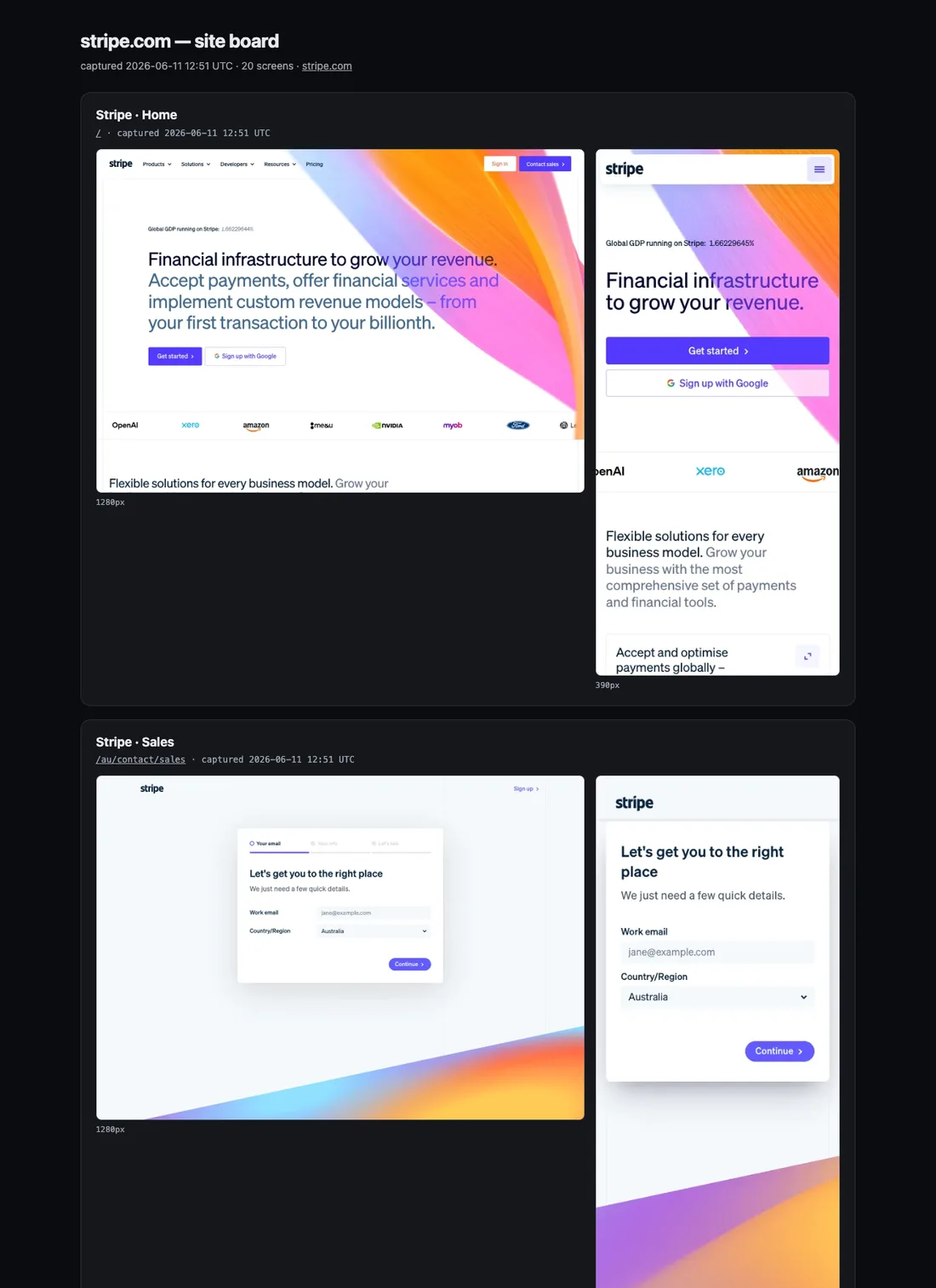
Nobody crawled anything and nothing was installed on the site — the agent reads what the site already publishes (its robots.txt, sitemap, and homepage links), picks the screens that matter, and shoots them with the browser on your machine.
A board you can point at — and so can your agent
The difference from the Figma file is what happens when you point. Every screenshot on the board is annotatable: tap a spot, type five words. And the comment isn't a sticky note — it carries the picture, the exact point you tapped, and the live URL the frame came from.
stripe.com/pricing — the live pageSo "make ours feel like this" stops being a pasted JPEG. The agent sees the same frame you do, knows the exact pixel you meant, and can open the live page behind it — read the real CSS, the real copy — instead of reverse-engineering a screenshot.
A board is honest about what it is, too: a dated snapshot, not the live site. Every frame says when it was shot, and the URL under it is there for checking what the page says now.
What people use it for
- Competitive teardown — board each rival, side by side, desktop and phone. Annotate what works. The audit that took an afternoon takes a coffee.
- Moodboarding — board the five sites you love. The vibe collection, except your agent can read it.
- "Steal this" — pin the exact hero, nav, or footer and tell the agent to adapt it. It gets the frame, the point, and the live page behind it.
- Flow studies — hand-pick the URLs through a signup or checkout flow and board the sequence in order.
- Staging review — board your own deploy and send the link. Teammates tap and comment in the browser — no accounts, no Figma seat — and every comment lands back with the agent.
- The pricing-page comparison — capture a competitor's board again with the same slug and compare the dated versions in one place.
- Before/after receipts — boards are timestamped. Shoot the site before the redesign ships, and the argument about whether it got better has evidence.
> drafty present <any url>— or however you phrase it to ClaudeWhere the pixels go
The screenshots are taken by the browser on your own machine — nothing is installed on the target site, and nothing crawls beyond the site's own sitemap and the pages you name.
The board itself is a normal canvas with your visibility settings: share the link with anyone, or keep it private — owner-only, enforced server-side — which is the right setting for boarding your own staging deploy.
Get started
One paste into Claude Code. It installs the Drafty plugin if you don't have it, then boards stripe.com — swap in your competitor, your hero site, or your own staging deploy:
Open the board it hands back, tap the thing you want to talk about, and type your five words. The agent does the looking.
And the loop continues inward: everything Claude builds for you opens the same way — a page you can tap, a comment that carries its context, an agent that sees what you saw.
Related help
- Can I annotate a live website?Yes — ask your agent to run drafty present on the site. Drafty turns any URL into a site board: the main screens, captured at desktop and phone width, on a canvas you can comment on like any other.
- What context does a comment capture?Every Drafty comment quietly records the view it was made from — the viewer's screen width, the tapped element's box, and the exact version on screen — so an agent can re-render exactly what the commenter saw.